
💬 Trade Action Generator
To execute your trades correctly, TradingView alerts need to follow our message format. The syntax is designed to be simple and consistent, though it can take a little practice to master.
The good news is that you don't need to learn and memorize it when using Pip Sender. Our Trade Action Generator helps you create correct messages effortlessly with just a few clicks.
How to Use
Trade Action Generator is available right in your connection details, under connection info.
- Select the action you want
- Adjust parameters as needed
- Copy generated message and paste into TradingView alert
Right in the Trade Action Generator, you can hover the icon next to each field for usage guidelines. Or you can read below:
1. Buy action
Symbol, Size and Order Type are mandatory fields. All other fields are optional.
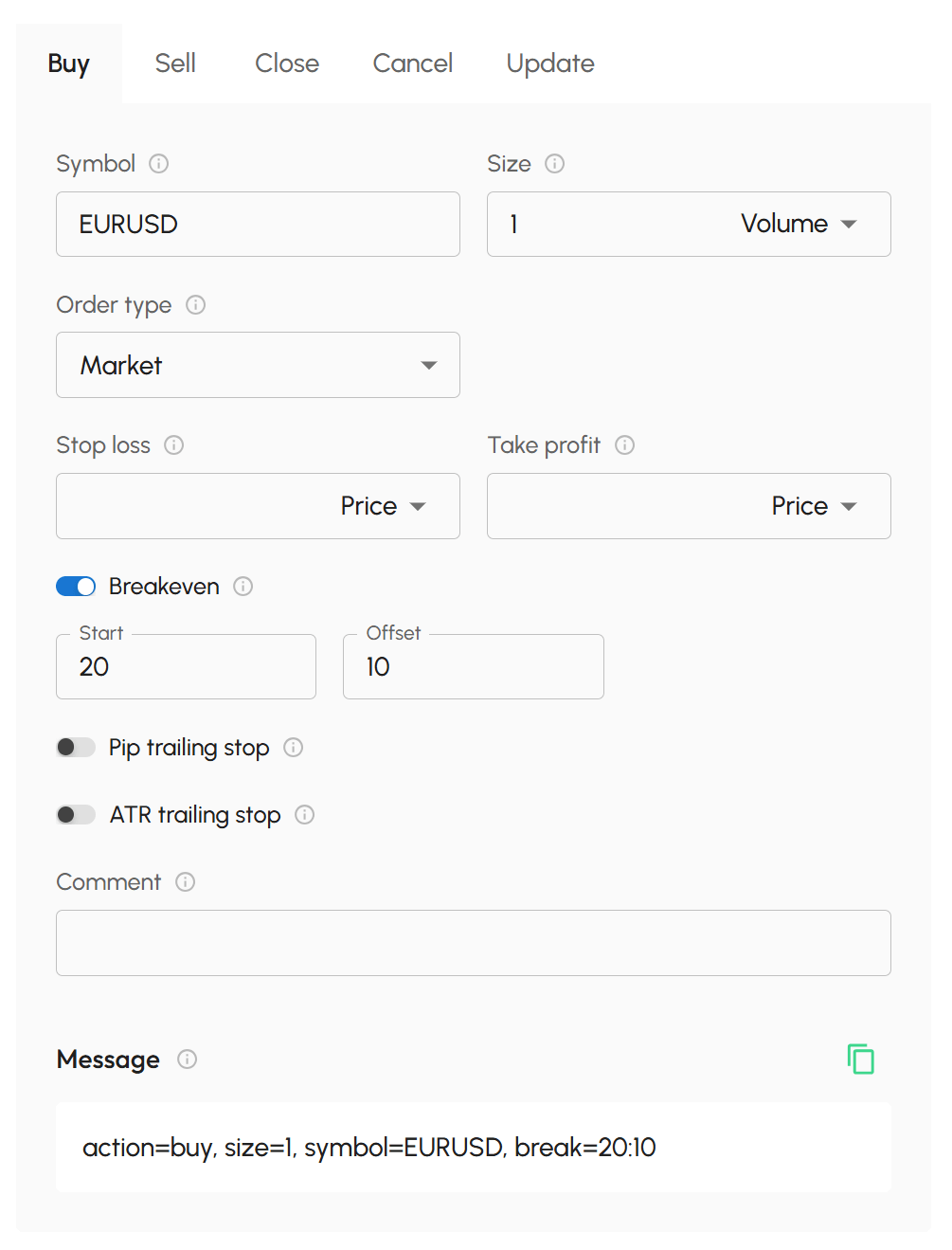
- Symbol: Enter the trading symbol you want to buy.
-
Size: Specific the size of buy order. Select the unit, then enter the value.
Supported units:
- Volume: Buy a fixed lot size of the symbol
- % Balance: Buy a size calculated as a percentage of account balance
- Currency: Buy using a fixed amount of your account's currency
-
Order Type: Select how the buy order should be placed.
Supported options:
- Market Price: Executes immediately at the current market price (a market order will be placed).
- Fixed Price: Executes at a specific price you define.
- A Value field will appear for you to enter the desired price.
- If the price is above the current market price → a Buy Stop order will be placed.
- If the price is below the current market price → a Buy Limit order will be placed.
-
Stop Loss: Specific the stop loss level. Select the unit, then enter the value.
Supported units:
- Price: A fixed stop loss price
- Point: A specific number of points away from the entry price
- %: A percentage distance from the entry price
Notes:
- Leave the Value field blank if you don't want to set a stop loss.
- Point is the smallest price change of symbol, depend on the symbol and broker.
- For EURUSD symbol with 5-digit brokers, 1 point = 0.00001. With 4-digit brokers, 1 point = 0.0001.
- For EURJPY symbol with 3-digit brokers, 1 point = 0.001. With 2-digit brokers, 1 point = 0.01.
- Take Profit: Specific the take profit level. As same as Stop Loss.
-
Breakeven: Configure breakeven settings. Toggle the switch to enable. It requires two parameters:
- Start: The trigger level, measured from the entry price, that activates the Breakeven. It must be > 0 and > Offset
- Offset: The price offset, calculated from the entry price, to which the stop loss is adjusted. Must be >= 0
Both Start and Offset are measured in Points (the smallest price change of symbol). The trailing stop logic is fully managed by the Pip Receiver. So keep it running on your MetaTrader terminal is required.
-
Pip Trailing Stop: Configure a Pip trailing stop. Toggle the switch to enable. It requires 3 parameters:
- Start: The trigger level, measured from the entry price, that activates the trailing stop. Must be >= 0
- Distance: The gap maintained between the current price and the stop-loss level. Must be > 0
- Step: The minimum price movement in your favor required before new stop-loss is adjusted. Must be > 0
All Start, Distance and Step are measured in Points (the smallest price change of symbol). The trailing stop logic is fully managed by the Pip Receiver. So keep it running on your MetaTrader terminal is required.
-
ATR Trailing Stop: Configure a ATR trailing stop. Toggle the switch to enable. It requires 5 parameters:
- Start: The trigger level, measured from the entry price, that activates the trailing stop. Measured in points (the smallest price change of symbol) and must be >= 0
- Timeframe: The timeframe used to calculate the ATR value.
- Period: The number of periods used in the ATR calculation. Must be > 0.
- Multiplier: he ATR multiplier used to determine the trailing stop distance. Must be > 0.
- Shift: The candle offset used for ATR calculation; 0 refers to the current candle. Must be >= 0.
MT4 timeframes: M1, M5, M15, M30, H1, H4, D1, W1, MN1
MT5 timeframes: M1, M2, M3, M4, M5, M6, M10, M12, M15, M20, M30, H1, H2, H3, H4, H6, H8, H12, D1, W1, MN1
The trailing stop logic is fully managed by the Pip Receiver. So keep it running on your MetaTrader terminal is required.
- Strategy: Enter a Strategy Id for this trade.
- No spaces or special characters allowed
- Maximum 20 characters
2. Sell action
This works exactly the same as the way you generate message for Buy action.
3. Close action
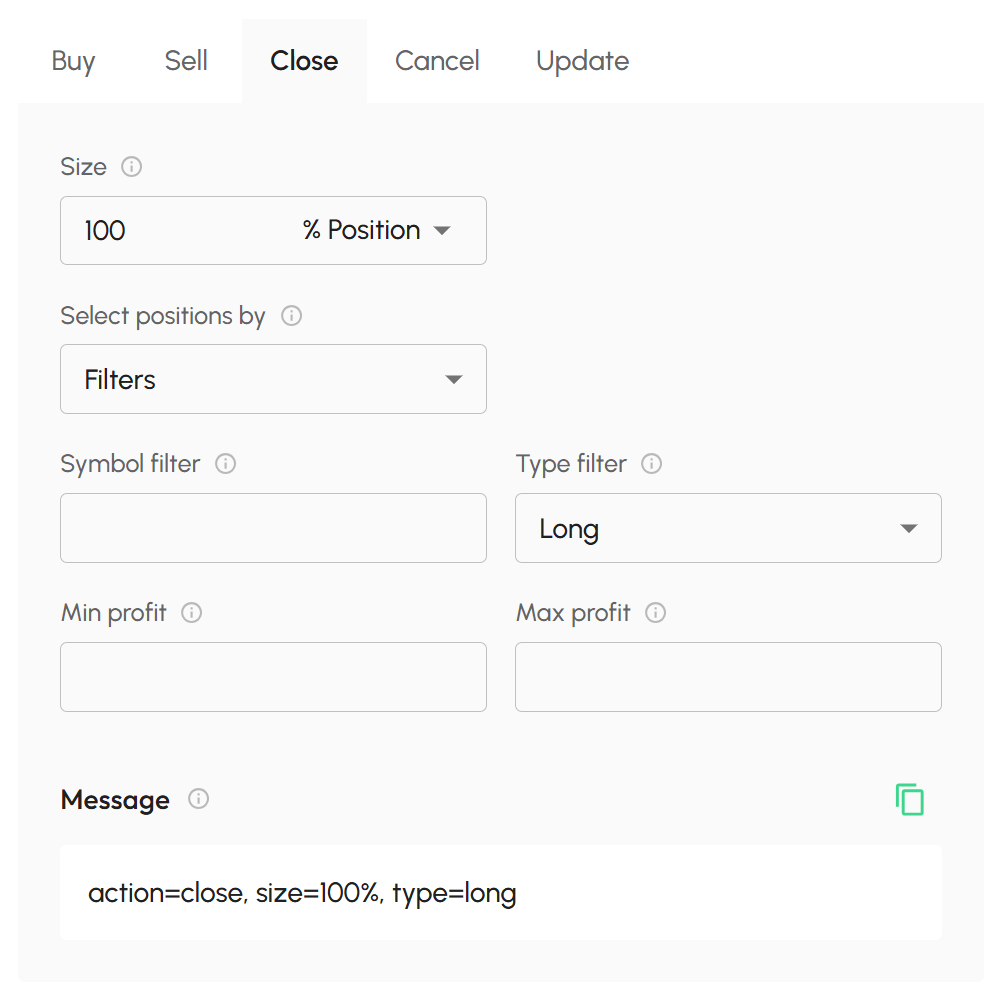
All fields are optional. If nothing is specified, all positions will be closed.
-
Size: Specify how much of the position to close. Select the unit, then enter the value.
Supported units:
- Volume: Close a fixed lot size of position
- % Position: Close a percentage of the position
Use the options under "Filter positions by" to filter which positions to close. A position will be selected only if it meets all specified conditions.
-
Type: Filter positions by type. Long, Short or all positions.
-
Symbol: Filter positions by symbol. Enter the symbol of positions you want to close.
-
Min Profit: Filter positions by a minimum profit value.
-
Max Profit: Filter positions by a maximum profit value.
-
Strategy:
- Enter the Strategy Id of positions you want to close. Strategy Id is what you have been set in Buy/Sell action.
- You can also able to enter the position Ticket here. Position Ticket is the ticket id of position from your broker.
4. Cancel action
All fields are optional. If nothing is specified, all orders will be canceled.
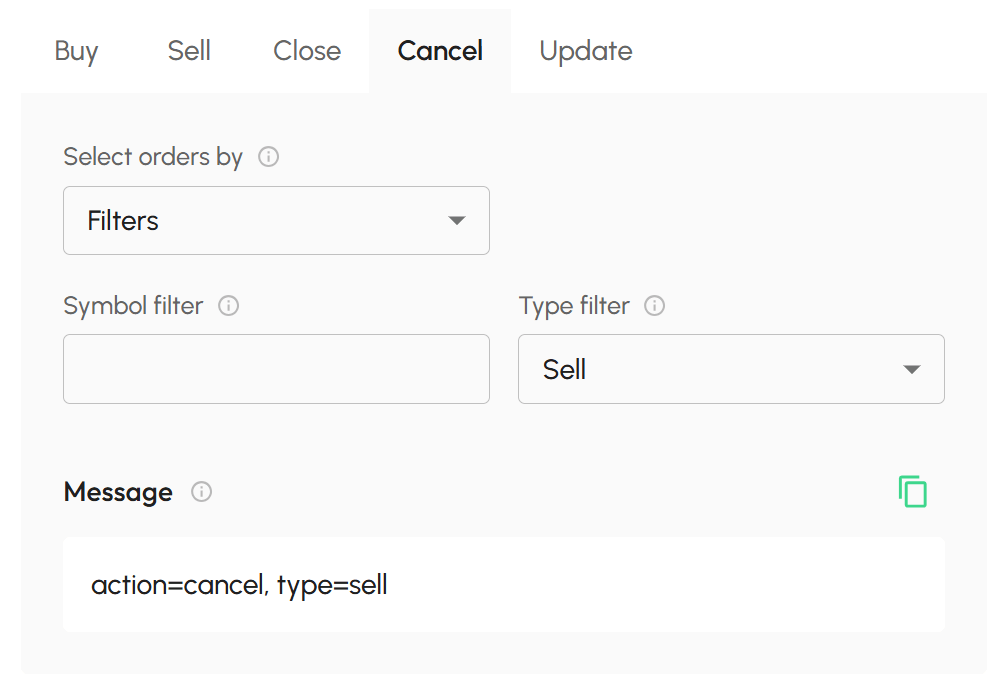
Use the options under "Filter orders by" to filter which pending orders to cancel. A order will be selected only if it meets all specified conditions.
-
Type: Filter orders by type. Buy, Sell or all orders.
-
Symbol: Filter orders by symbol. Enter the symbol of orders you want to cancel.
-
Strategy:
- Enter the Strategy Id of orders you want to cancel. Strategy Id is what you have been set in Buy/Sell action.
- You can also able to enter the order Ticket here. Order Ticket is the ticket id of order from your broker.
5. Update action
Type is a mandatory field. All other fields are optional. However, at least one update detail should be specified. Otherwise, nothing will be updated.
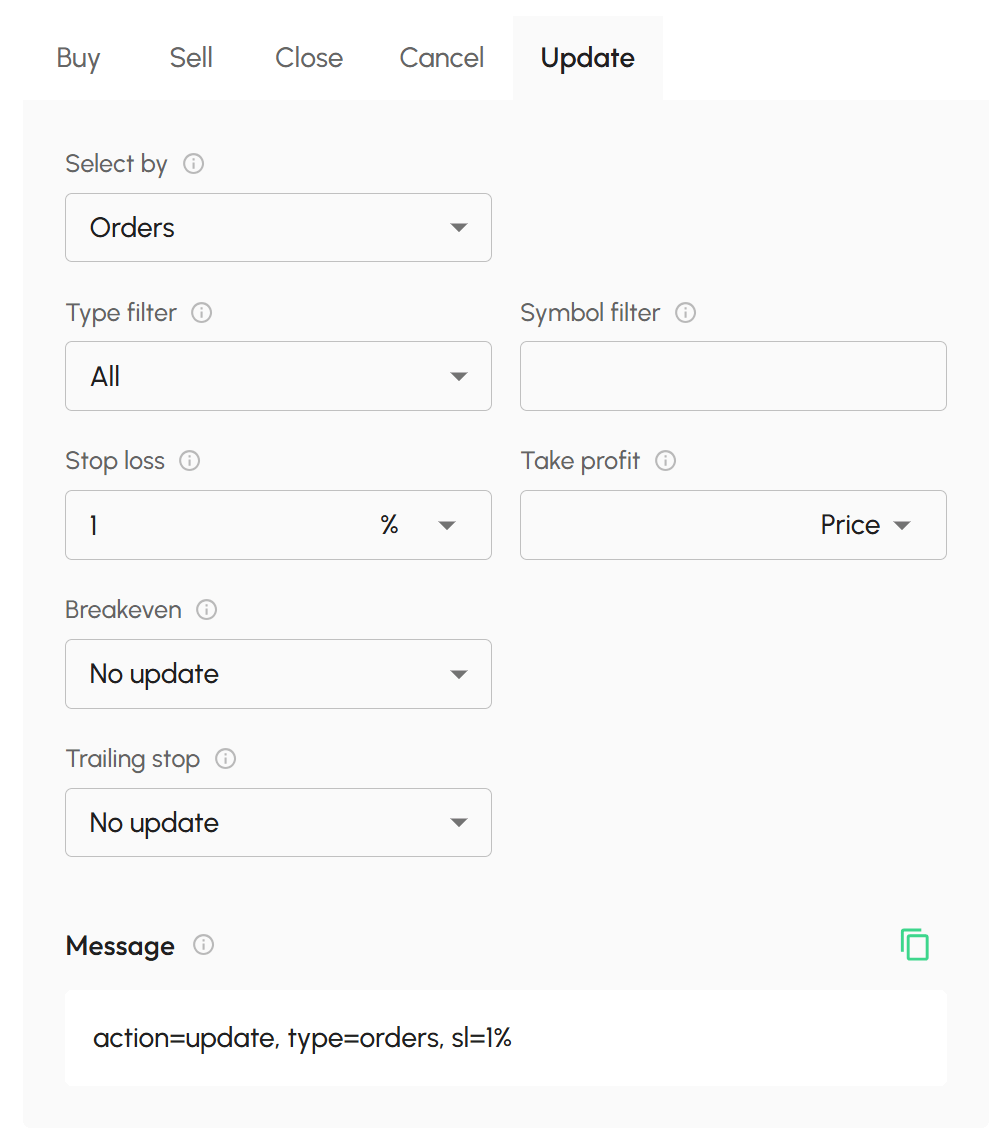
Use the options under "Filter trades by" to filter which opening positions or pending orders to be updated. A trade will be selected only if it meets all specified conditions.
-
Type: Filter trades by type. Long, Short or all positions. Buy, Sell or all pending orders.
-
Symbol: Filter trade by symbol. Enter the symbol of trade you want to update.
-
Strategy:
- Enter the Strategy Id of positions/orders you want to update. Strategy Id is what you have been set in Buy/Sell action.
- You can also able to enter the trade Ticket here. Ticket is the ticket id of the trade from your broker.
Use the options under "Updated values" to to specific which values of trade will be updated. You can update one or more values at the same time.
-
Price: Specific new entry price of pending orders. This option is available for pending order only.
Notes:
- New entry price must be valid for the current order type.
- New entry price must not conflicked with current SL/TP levels.
For example:
- Current market price of XAUUSD is 5000
- Current entry price of your pending buy order is 4900 (a Buy limit order)
- Current SL = 4800 and current TP = 5200
Some common invalid cases:
- Updated entry price = 5050. Because it is higher than market price and should be a Buy Stop order, not Buy Limit order anymore.
- Updated entry price = 4750. Because it is lower than your current SL level.
-
Stop Loss: Specific the new stop loss level. Select the unit, then enter the value. Use 0 to remove current SL level.
Supported units:
- Price: A fixed stop loss price
- Point: A specific number of points away from the entry price
- %: A percentage distance from the entry price
- Take Profit: Specific the new take profit level. As same as Stop Loss.
-
Breakeven: Update breakeven settings.
- No Update: Keep the existing breakeven settings
- New Setup: Apply a new breakeven configuration
- Remove: Delete the current breakeven setup
- Pip Trailing Stop: Update a pip trailing stop.
- No Update: Keep the existing trailing stop settings
- New Setup: Apply a pip trailing stop configuration
- Remove: Delete the current trailing stop setup
- ATR Trailing Stop: Update a ATR trailing stop.
- No Update: Keep the existing trailing stop settings
- New Setup: Apply a ATR trailing stop configuration
- Remove: Delete the current trailing stop setup